Case Study: Appliance+

Context
In Q1 of 2021, I joined the Device Collection product team as the lead designer. The team's objective is:
-
Create a singular, scalable flow that can be used wherever a user adds and manages a device in the ecosystem of all of Asurion's products. This includes our mobile, smart home, and appliance products
Most people know Asurion as a mobile phone insurance provider. However, in an effort to become the trusted companion for all things tech, Asurion expanded their offerings to cover the appliances in your home with the introduction of Asurion Appliance+. For a monthly fee, we'll protect the appliances you own (within the beta list of approved appliance types) outside of their original manufacturer warranties.
The problem
We wanted to create a dashboard for our Appliance+ customers where they could add the appliances they own and easily manage them from one central place. As the lead designer on the Device Collection team, my job was to specifically create the Add an Appliance flow and Appliance Details page that would serve as a launching pad for the Appliance+ product team to expand upon and ultimately own. On top of thinking about how this flow might look specifically for appliances, I also had to keep in mind our parallel products that require similar functionality (i.e. adding and managing a smart home device) and make sure this experience would serve those purposes as well.
Understanding scope
The first thing I did was meet with the Appliance team and determine the scope of the project: what kind of functionality this experience would need, who the user would be, what kind of information we would need from the user, and what value we can provide for knowing that information. From speaking to them, we identified a hierarchy of information we would need to know about the appliance:
-
Type of appliance (fridge, microwave, etc.)
-
Brand
-
Model number
-
Serial number
And reasons for needing them:
-
Type of appliance (fridge, microwave, etc.): We can't necessarily provide value for simply knowing you own a fridge or a microwave, but it's the most basic level of information someone can tell us about their appliance.
-
Brand: By knowing the brand, we can provide brand-specific content to the user (Samsung has had a recall, Kenmore went bankrupt, general information about Frigidaire's warranties, etc.
-
Model number: By knowing the model number, we can start to provide more specific value to the user about their appliance (option to set up a subscription for water filters for your specific fridge, a part recall for your specific dishwasher, etc.)
-
Serial number: By collecting serial number, we can more specifically know how old your appliance is (and know if it's still under the original manufacturer warranty) and already have that information stored if you need to file a claim on an appliance.
Determining the user wasn't so clear (and, frankly, is still up in the air to this day). Since Appliance+ is a new product offering and we're still in the beginning stages of developing it, there is only one way a customer can get signed up: from an expert in the home. We have paired up with appliance manufacturers (like Samsung) where, if they get a call that an appliance of theirs needs a repair, they send out someone from our team of repair experts. After completing the repair, we then pitch the customer on Appliance+ so they'll be covered for all similar repairs in the future. Since the expert is already in the home at the point of sale, the idea is that they'll be able to go around the home and add the appliances to the customer's account for them. However, this might not always happen or be possible, so the customer should always have a way to add them themselves after the expert has left. We also haven't been able to figure out logistically how and on what platform the expert would be able to add the devices for the customer. For this reason, I went forward with the mindset that the customer was the primary user and the expert was a potential secondary user.
Research
Now that I knew the scope of the project, I was able to begin some research. The first question I had that would largely shape what the Add an Appliance flow would become was: how easy is it for an average appliance-owner to find the product sticker?
I enlisted several coworkers to go around their house and collect the serial model numbers from all of their eligible appliances, all while timing themselves. The average amount of time to collect all of the information (with an average of 6 appliances per participant) was around 3 minutes. Some insights from some of the users:
-
"This was super simple. For some reason, I was worried I wouldn't be able to get to my washer/dryer labels, because we were in the middle of running a load of laundry. Thankfully, they were just on the side of the machines."
-
"I was SO SURPRISED that it was easy to find all the stickers on our appliances."
-
"Felt like a chore thinking about doing it, but once I got rolling I wanted to find everything"
Some questions/concerns that came out of it:
-
"It was more difficult to get straight on pictures of some of the stickers depending on their location – if we use image-identification will that be a problem?"
-
"This might be hard for people who can't contort/bend (elderly, disabled, etc.); for example, the sticker for my oven was on the lip inside the broiler drawer"
-
"My appliances are fairly new– what about old, used devices? Do they fade over time? Peel off?"
-
"I'm wondering how best to let users know which of their devices are covered (& how to direct them to answers as to why others aren't). Maybe we let them add uncovered appliances anyway? Maybe this isn't an issue if this will always be an expert-led experience. But my husband kept asking, "what about [insert appliance type]?"
While searching for their serial and model numbers, I also instructed users to take pictures of their appliance product stickers. In the future, an ideal experience might be having the user take a picture and we could parse out the important information with the help of AI, so we were curious at how much the product stickers differ in appearance. Turns out they vary quite a bit! While taking the information out of the sticker by using an image isn't something we have the technology for right now, collecting images of the stickers might be a way to teach the AI in the meantime.


Product stickers for 3 different refrigerators
User flow and prototyping
By working through what kind of information we need to collect from a user about their appliance and how/where my coworkers got caught up in collecting their appliance information, I was able to figure out a general userflow from selecting a type of appliance to successfully adding it to their dashboard.
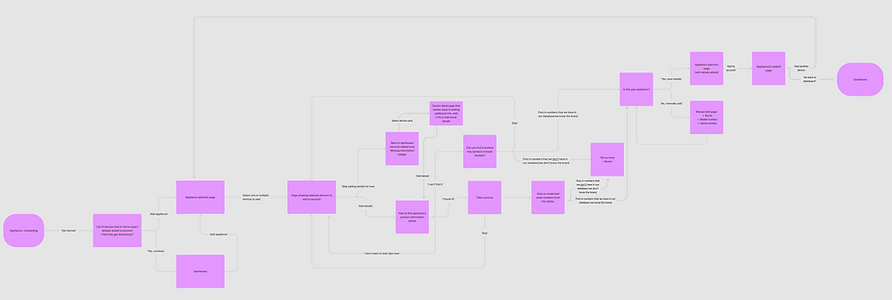
With this user flow clearly mapped it out, it made the task of determining MVP that much easier. A lot of features (the ability to add multiple appliances at a time, etc.) could be cut for initial release without any big negative impacts to the user experience.
From there, I was able to create a simplified Figma prototype to start usertesting, using Asurion Design System elements where I could to create an experience that was cohesive with the rest of Asurion's ecosystem of product offerings and working closely with the design system/patterns team to create solutions where a pattern didn't exist yet.
Usertesting
I was able to put together a Figma prototype based on our MVP approach (here) and do some basic usability testing with two different versions:
-
Both tests: A user is given information about an appliance to add (Samsung fridge, Model number PYE22KMKOES, Serial number DR506680). User is instructed to add the appliance and check if it was successfully added.
-
Can the user successfully add an appliance?
-
Is anything confusing to the user?
-
Do they know how to check if it's been successfully added?
-
What do they expect to find on the appliance details page?
-
-
Test 1 path: A user is given information about an appliance to add (Samsung fridge, Model number PYE22KMKOES, Serial number DR506680). User puts in model and serial number and we parse out the wrong brand from the model and serial numbers they gave us (GE).
-
Does the user notice and change the brand to the correct one?
-
If yes, are they able to easily and intuitively change the brand?
-
How do they react to us getting the brand wrong?
-
-
-
Test 2 path: A user is given information about an appliance to add (Samsung fridge, Model number PYE22KMKOES, Serial number DR506680). User puts in model and serial number and we ask what brand it is, not using our database to determine the brand from the model and serial numbers.
-
Does the user make any comments about us having to ask for brand?
-
Do they react favorably or unfavorably?
-
-
Overall, users had a very simple time adding an appliance to their account but ran into a few snags:
-
Users expected page to auto-proceed when hitting refrigerator card ('continue' button was below the fold)
-
Test 1: Users question why we would get the brand wrong if we have the serial and model numbers
-
Test 1: Some users didn't realize the brand we parsed was wrong and continued to add the appliance
From these insights, I made a few changes:
-
Make the 'Continue' button on the appliance selection page sticky to the bottom of the viewport so it's always visible
-
If we have any question of what brand an appliance is from the model and serial number provided, we should just ask the user to tell us what brand it was
This flow is not live yet, but I'm excited to launch it and learn even more about how real users interact with it!